


lPlayer - Offline Video Player
3.8717.00 Reviews
App Specs
- Version
- 2.8.2
- Updated On
- License
- Free
- Downloads
- 10,000,000+
- Developer
- snap game team
- Categories
- Video Players & Editors
- Platform
- Android, iOS
Screenshots
 Analysis by AppCompare
If you're like me and often find yourself without a reliable internet connection or prefer to keep your video content offline, then you're going to love lPlayer - Offline Video Player. This app has become my go-to solution for seamless video playback on my mobile device. Let me walk you through why this app has become indispensable for me and might just be the perfect fit for you too.
Where it fits into a video routine
I find this kind of player most useful when I already have video files saved on my phone and want to play them without streaming. That makes it a practical choice for a downloaded lecture, a home video, or an episode set aside before a commute. The key distinction is that a video player handles playback; it is not automatically a place to discover or download entertainment. I would prepare the files beforehand, then use lPlayer when I want to watch them.
A realistic example is a train ride where the connection keeps dropping. I would choose the video while I still have time, check that it is stored locally, and open it in the player before boarding. That small check matters: an offline player cannot make a file available if it was never saved on the device in the first place. It also avoids the frustration of discovering midway through a trip that the video I expected to watch was only accessible through an online service.
Why lPlayer Stands Out
First things first, what makes lPlayer - Offline Video Player so special? Well, the app is designed with simplicity and functionality at its core. You don’t need to be a tech guru to navigate through its interface, which is a huge plus in my book. The straightforward design ensures that even if you’re new to video player apps, you’ll find it intuitive and user-friendly.
That simple approach is also the main point of comparison with the video app already installed on a phone. A built-in player may be enough for occasional clips, but a separate player is worth considering when you keep a personal collection of files and want a dedicated place to play them. I would not switch just because lPlayer is another option; I would try it when format handling or offline playback is a regular part of my routine.
Compatibility and Formats Galore
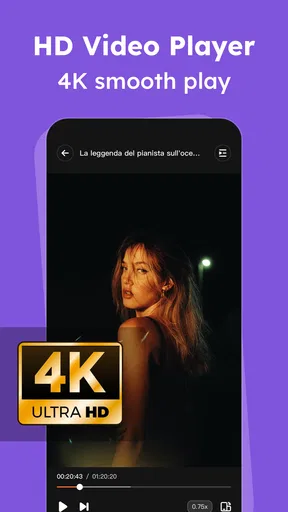
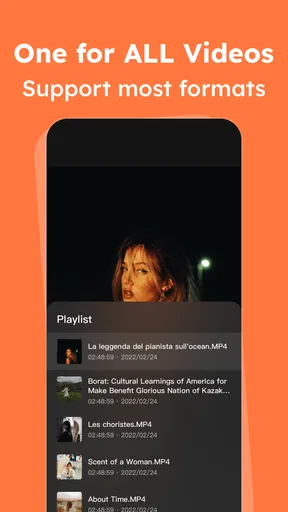
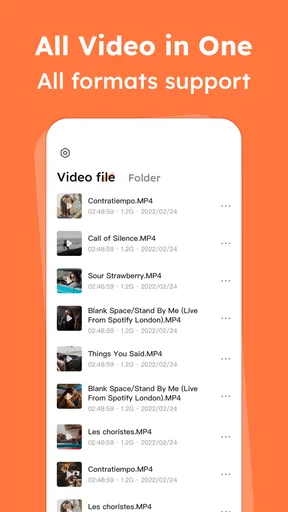
One of the standout features of lPlayer is its extensive compatibility with various video formats. Whether you have an MP4, AVI, MKV, or any other format, this app has got you covered. It’s super convenient not having to worry about converting your files before playing them. Just drag, drop, and enjoy!
In practice, format support is most valuable when a file comes from a different source than the usual camera or streaming app. If a clip refuses to open in the default player, trying it in a dedicated player can be a sensible next step before spending time converting it. I would still keep the original file untouched until playback works as expected. Compatibility can save a conversion step, but it does not guarantee that every video will behave identically; a file’s encoding and subtitles can affect the result.
Worth Reading Before You Choose

EA SPORTS FC Mobile 26 Is a Bigger Football Game, but It Takes Time

Flipboard Shows What News Apps Must Do Beyond the Feed

Switching to Android Auto Means Rethinking Your Driving Routine

Google Calendar Makes a Crowded Week Easier to Manage

Ludo King Makes the Most of the Minutes Between Plans

Baby Panda World Brings Quick Play to Modern Phones, but Its Game Library Feels Busy
For a useful first test, I would open a short, nonessential clip in each format I expect to watch often. That quickly shows whether the player suits my actual collection, rather than relying on a long list of formats as a promise that every file will be trouble-free. It is a small check that can prevent a larger annoyance later, especially before travel.
Offline Accessibility
As someone who travels frequently, having offline access to my favorite shows and movies is a game-changer. With lPlayer, you can download your videos and watch them anytime, anywhere, without needing to drain your data or search for Wi-Fi. It’s like having a portable cinema in your pocket.
I would treat offline viewing as a file-preparation workflow rather than an app that fetches films for me. Save or transfer the videos you are allowed to keep, confirm that they appear on the device, and test one before leaving a reliable connection. This is especially useful for a student who has course recordings, or a parent who wants familiar clips ready for a child during a wait. In both cases, the benefit is predictable playback without depending on a signal.
There is a trade-off, though: downloaded files take up local storage, and keeping a large collection can make it harder to manage space for photos or other apps. I would keep only the videos I expect to watch soon and remove them when they are no longer useful. That simple habit makes an offline library easier to maintain than letting every old file accumulate.
Customizable Viewing Experience
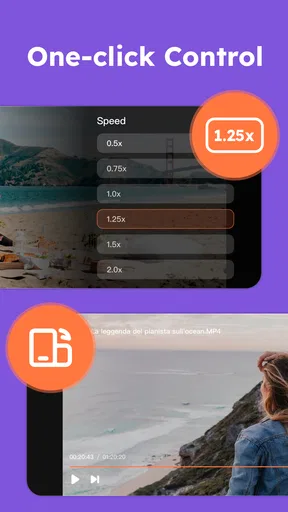
Another aspect that I absolutely adore is the customization options. You can tweak the playback speed, adjust the brightness, and even apply subtitles. This level of control means that you can tailor your viewing experience to suit your preferences perfectly. Plus, the app remembers your settings, making it a breeze to pick up right where you left off.
Playback speed has a particularly practical use beyond personal preference: I might slow down a fast tutorial to follow a detail, or speed up a familiar talk when I am reviewing it. Subtitles can also make a quiet room or a noisy journey more manageable, provided the subtitle file or track is available and recognized. For a series of short lessons, adjusting speed can make review sessions more efficient without changing the source video.
My advice is to test brightness and speed controls on a short clip before settling in for a full film. A setting that helps with one video may feel wrong on another, and a comfortable screen level can matter more over a long session than it does during a quick check. If you share the device, I would also verify the playback settings before handing it to someone else, so the next person does not inherit an unexpected speed or brightness level.
Battery and Performance Efficiency
Let’s talk about battery life. Many video apps are notorious for draining your device’s power faster than you can say "low battery." But with lPlayer, the app is optimized to preserve battery life without sacrificing video quality. This is crucial for those long flights or road trips where charging options might be limited.
For a long viewing session, I would still plan around the phone rather than assume any player can remove battery limits. Lowering screen brightness, closing other demanding tasks, and keeping a charger or power bank available are sensible steps on a trip. If playback seems unusually demanding, testing a shorter video first can help separate an issue with one particular file from the general experience of watching offline.
Offline playback also has a different practical advantage from streaming: it avoids relying on a connection during the video. That does not by itself settle every battery or performance question, but it does make the viewing plan less vulnerable to weak coverage and buffering. For someone who watches a few clips in spare moments, the built-in player may be simpler; for a person who regularly prepares videos for journeys, a dedicated offline player can be more useful.
Security and Privacy
If privacy is a concern for you, lPlayer has you covered. Unlike some other apps that might require unnecessary permissions, this app is designed with your security in mind. It doesn’t collect any personal data, so you can enjoy your videos with peace of mind.
I would still use the ordinary care I apply to any media app: install it through a trusted store, pay attention to permission prompts, and avoid placing sensitive files somewhere other people can browse on a shared device. A player’s privacy claims do not replace device-level security or good file organization. If you lend your phone often, consider whether personal recordings should be kept among the videos you open casually.
Regular Updates and Support
The developers behind lPlayer are constantly working to improve the app, rolling out regular updates to fix bugs and enhance features. It’s reassuring to know that the app is well-supported and continues to evolve with user needs.
The current version is 2.4.0, and the app was released on January 19, 2024. Those details give me a concrete sense of its present stage, but they do not tell me exactly which individual features changed between releases. For someone who already uses it, the practical approach is to keep the app current and check that an important file still plays after an update, particularly before relying on it during a trip.
lPlayer is a free app from snap game team, with in-app purchases ranging from $1.99 to $29.99 per item. It is rated for Everyone, and it has a 3.9 average from around 40,000 ratings, with about 694 written reviews and over 10 million installs. I would treat those figures as context rather than proof that it will suit every phone or every collection. The free starting point makes it approachable, while the in-app purchases are worth keeping in mind if you prefer to avoid optional spending; I would check what an offered purchase does before deciding whether it matters to my use.
Who will get the most from it
I would recommend trying it if your phone holds videos you have personally saved, if you travel through areas with unreliable coverage, or if you often need subtitles and playback-speed control. It is also a reasonable option for someone who receives video files from different sources and wants to test them without immediately converting everything. Those are specific needs that make a dedicated player more useful than an app used only for occasional camera clips.
On the other hand, I would skip it if nearly all your viewing happens inside streaming services, where downloads and playback are tied to each service’s own app. It may also be unnecessary if the standard player already opens every file you use and you do not need extra playback controls. People who want a polished library for cataloging, synchronizing, or discovering video should compare other tools designed around those jobs rather than choosing solely on the promise of offline playback.
One question I would ask before relying on any offline player is whether my actual files open correctly, including their subtitles. Another is whether I have enough free storage for the videos I plan to take along. I would answer both by testing a representative file and checking available space before a journey, not by waiting until I am offline. If those checks go well, the app’s straightforward role is easy to understand: it plays local videos when I want them without requiring a streaming session.
In conclusion, if you’re in need of a reliable, efficient, and user-friendly video player app, lPlayer - Offline Video Player should be at the top of your list. It offers a perfect blend of simplicity and advanced features, making it a must-have tool for any video enthusiast. Whether you're a frequent traveler, a daily commuter, or just someone who loves watching videos without interruptions, this app delivers a quality experience that's hard to beat.
Ready to give it a try? You can easily download lPlayer from the App Store or Google Play and start enjoying your videos offline today!
Pros
- Supports a wide range of video formats.
- No internet needed for playback.
- User-friendly interface design.
- Supports subtitle integration.
- Efficient battery usage.
Cons
- Lacks advanced editing features.
- Ads can be intrusive at times.
- Limited customization options.
- No cloud syncing available.
- No built-in content library.
FAQs for lPlayer - Offline Video Player
What video formats does lPlayer support?
lPlayer is designed to handle a wide variety of video formats, including MP4, MKV, AVI, and MOV. This versatility ensures that users can play almost any video file they have without needing to convert it. The app's ability to support high-definition formats also means you can enjoy crisp and clear playback.
Is lPlayer free to use, and are there any in-app purchases?
lPlayer is available for free download on both Android and iOS platforms. While the core features are accessible without any cost, there are optional in-app purchases available. These typically include premium features such as ad removal, advanced playback options, and additional customization settings.
Can lPlayer play videos offline?
Yes, one of the standout features of lPlayer is its offline playback capability. Users can easily download videos to their device and watch them without an internet connection. This makes it a convenient choice for travelers or those with limited data plans who want to enjoy their media on the go.
Does lPlayer offer subtitle support?
lPlayer provides robust subtitle support, allowing users to load external subtitle files or use embedded subtitles within video files. The app supports various subtitle formats such as SRT and ASS, and offers customization options for font size, color, and synchronization, enhancing the viewing experience for users who rely on subtitles.
How user-friendly is the lPlayer interface?
lPlayer boasts an intuitive and user-friendly interface designed to make video playback simple and enjoyable. The app features a clean layout with easy-to-navigate menus, allowing users to quickly access their video library and playback controls. New users will find it easy to learn, while experienced users will appreciate its efficiency.


